


Whoosh
4.6349.00 Reviews
App Specs
- Version
- 3.18.0
- Updated On
- License
- Free
- Downloads
- 10,000,000+
- Developer
- WSH MOBILITY
- Categories
- Auto & Vehicles
- Platform
- Android, iOS
Screenshots

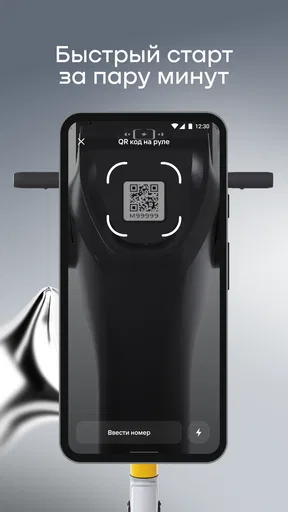

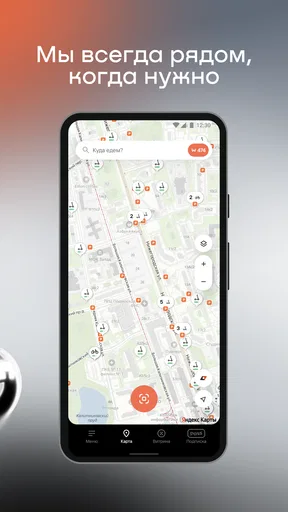
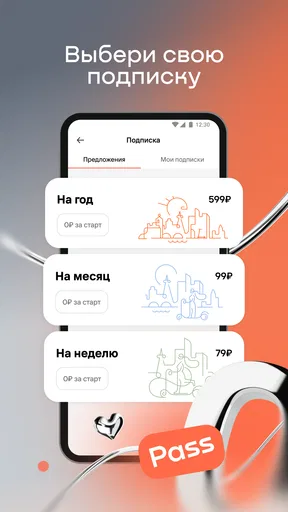
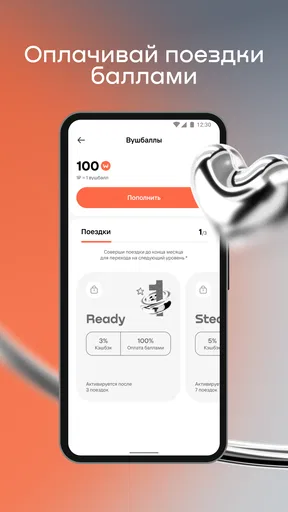
 Analysis by AppCompare
Ever found yourself in a situation where you wished you could just press a button and have a ride at your doorstep? Welcome to the world of Whoosh, a ride-sharing app that’s making waves in urban transportation. Let me take you through my experience with this app and see if it really lives up to the hype.
Start with the trip, not just the app
There’s a practical question behind that wish for a ride at your doorstep: is a shared scooter actually the right way to finish this particular journey? I find Whoosh most appealing for short urban hops where walking would take too long, but a car feels excessive. Think of the stretch between a transit stop and an appointment, or a quick trip across a neighborhood when carrying a full bicycle would be awkward.
That choice depends on the trip as much as the app. A scooter can be a useful middle ground between walking, public transport, taxis, and owning a bike, but it does not replace all of them. I would use a bus or train for a longer cross-city route, and I would keep walking as the simpler option when the destination is close. Whoosh makes most sense when a scooter is available near the start, the destination is practical to reach, and I have enough time to check the route before setting off.
Getting Started with Whoosh
First things first, downloading Whoosh from the app store was a breeze. Whether you’re an Android enthusiast or an iOS devotee, it’s available for both. Once installed, signing up was straightforward—just the usual name, email, and phone number. What sets it apart, though, is the user-friendly interface. It’s like the app is saying, “Hey, I get it, you just want to get from point A to B without the hassle.”
Check the route before you commit
Whoosh is a scooter-sharing app from WSH MOBILITY, rather than a conventional ride-hailing service that sends a driver in a car. That distinction matters when planning: you are choosing a vehicle you ride yourself, so the decision involves more than entering a destination and waiting at the curb. I’d first make sure the route is suitable for a scooter and that I’m comfortable riding in the conditions I expect to encounter.
The app is free to install, and its Everyone content rating makes it broadly accessible as an app. That should not be confused with a promise that every person or every journey is a good fit for scooter riding. I’d still treat traffic, weather, visibility, and my own riding confidence as part of the decision. If I were heading out in heavy rain, carrying something bulky, or travelling with someone who cannot ride, I’d choose another way to get there.
When I open a scooter-sharing app, I want to answer a few questions before walking to a vehicle: is there a scooter near me, can I reach the destination sensibly, and will the trip solve the problem better than walking or transit? That order helps avoid the common mistake of choosing a vehicle first and figuring out the route afterward. It also leaves room to change plans if the nearest option is inconvenient.
Worth Reading Before You Choose

Switching to Android Auto Means Rethinking Your Driving Routine

Google Calendar Makes a Crowded Week Easier to Manage

Baby Panda World Brings Quick Play to Modern Phones, but Its Game Library Feels Busy

ESPN’s Live Game View Makes Following Close Games Easier

QuizzLand Review: A Good Fit for Short Trivia Breaks, Not Every Player

Basketball Stars: Multiplayer Is Fast, but Can It Recover When Matches Go Wrong?
Features That Stand Out
What really impressed me was the range of features Whoosh offers. You’ve got your standard ride options like economy and luxury, but what caught my eye was the eco-friendly ride choice. It’s a great way to reduce your carbon footprint while still getting around efficiently. Plus, the app’s real-time tracking feature is spot on. No more guessing where your driver is; you can actually see them coming your way.
Another cool feature is the fare estimator. You can check how much the trip will cost even before booking, saving you from any unpleasant surprises. And if you’re someone who likes to plan ahead, the app allows for scheduling rides in advance. Talk about convenience!
Make the handoffs part of the plan
For a shared scooter, the handoffs are different from a car ride: you move from your own journey to the shared vehicle, then from the vehicle back to walking or another form of transport. I’d build in a moment to get oriented at the start rather than setting off while distracted by my phone. If I’m connecting from a station, I’d also check that the scooter’s location and the station exit line up in practice; a pin on a map does not necessarily mean the vehicle is right beside the door I’m using.
The same thinking applies at the destination. Before starting, I’d consider where I can reasonably end the ride and whether I’ll be comfortable making the last part on foot. This is especially useful when the destination is a building with a large campus, a busy shopping area, or a venue where the final entrance is not obvious. A few seconds of planning can prevent a rushed search at the end of the trip.
One useful habit is to keep the phone workflow separate from the riding workflow: check what you need while stopped, then put the phone away and focus on the road. If plans change mid-trip, I’d pull over somewhere safe before using the app again. That small pause is a better trade-off than trying to navigate and ride at the same time.
The Ride Experience
Once my ride was booked, I received a notification with all the details—driver’s name, car model, and estimated arrival time. The driver was courteous and the car was clean, which is always a plus in my book. The journey was smooth, and I found myself appreciating the in-app music feature, where you can sync your favorite tunes with the car’s audio system. It’s those little touches that make the ride more enjoyable.
Know when a scooter is the wrong tool
My everyday example would be leaving a train station for a meeting that is too far away to walk comfortably but close enough that a car would feel like overkill. I’d check for a nearby scooter, take a moment to judge whether the streets on my route look manageable, then ride the short connection and finish on foot. That kind of trip is where scooter sharing can feel genuinely useful: it bridges a gap without turning a simple errand into a larger transport arrangement.
For a commute, I would think about both directions rather than assuming the outward trip tells the whole story. The scooter might be convenient near home but less convenient at the workplace, or the return journey might happen in different conditions. If a trip depends on arriving at an exact time, I’d leave a margin rather than treating the scooter as a guaranteed shortcut. Having a bus, walking route, or other backup in mind makes the decision less stressful.
Compared with a taxi or ride-hailing car, a scooter gives me more independence from a driver and can suit a short journey where I do not need a passenger vehicle. Compared with a personal bicycle, it avoids bringing my own bike along, but I also have less control over whether a shared vehicle will be conveniently placed when I need one. Public transport remains the stronger choice for many longer trips, while walking wins for short distances that do not justify unlocking a vehicle. Whoosh is most useful in the space between those options, not as a universal replacement for them.
Payment and Rewards
Paying for the ride was hassle-free. Whoosh accepts multiple payment methods including credit cards, PayPal, and even some digital wallets. Now, here’s something that I think many will love—the rewards program. You earn points for every ride, which can be redeemed for discounts on future trips. It’s a nice way to get a little something back for being a loyal user.
For a first-time user, I would treat the payment step as part of checking the overall trip rather than assuming that a quick ride is automatically the cheapest option. The useful comparison is not only against a taxi: it is also against the cost and effort of walking, transit, or using a bicycle already at hand. Rewards can make repeat use feel more worthwhile, but I would not take a ride I do not need just to collect points.
There is also a difference between planning a journey and relying on a booking in advance. The original experience described a scheduled ride, but with a shared scooter I would avoid assuming that a particular vehicle will be waiting at a future time unless the app clearly shows that option for the trip I’m making. For a time-sensitive appointment, I’d check what is available when I’m ready to leave and keep a backup route in mind.
Customer Support and Safety
Let’s talk about customer support for a moment. There’s an in-app chat feature that connects you directly with the support team. I had a question about the rewards program and got a response within minutes. It’s reassuring to know that help is just a few taps away if you need it.
Safety is another area where Whoosh shines. The app includes a feature to share your ride details with friends or family, so they know exactly where you are. There’s also a panic button that connects you to emergency services, which gives an added layer of security.
Where the journey can get awkward
The biggest friction in scooter sharing is that the trip depends on more than the app interface. I still need to get to the vehicle, be ready to ride it, and decide whether the route and ending point work for me. That makes Whoosh less convenient for anyone who wants door-to-door transport, is uncomfortable riding a scooter, or has luggage that is difficult to manage. In those cases, a car, transit, or simply walking may be the better call.
Availability can also shape the experience: if a suitable scooter is not nearby when I need one, the central benefit disappears and I have to switch plans. I would not build a tight connection around an assumed scooter being there. The practical move is to check before setting off, then compare the walk to the vehicle with the time saved by riding it. If that walk erases the advantage, I would not force the trip.
For anyone new to shared scooters, I’d also take a moment to understand the app’s prompts and the local riding context before relying on it for an important journey. Keep attention on the surroundings, avoid handling the phone while moving, and choose another option whenever conditions feel unsuitable. Convenience is only a real benefit when the journey remains comfortable and controlled.
Final Thoughts
So, is Whoosh the ride-sharing app you’ve been waiting for? If you’re looking for a reliable, feature-packed option that prioritizes user convenience and safety, then yes, it definitely is. It’s not just about getting from one place to another; it’s about enjoying the journey, and Whoosh makes sure of that.
Whether you’re commuting to work, heading out for a night on the town, or just need a ride home after a long day, Whoosh has got your back. So go ahead, give it a try, and see how it changes the way you travel in the city.
Who is likely to get the most from it?
I’d recommend Whoosh to someone who already has a clear use for short scooter trips and wants a way to fill gaps between walking and public transport. It is also a sensible app to consider if you are comfortable making the ride yourself rather than waiting for a driver. The overall rating is 4.6 from around 772,000 ratings, and it has passed 10 million installs, so it has found a large audience. Those figures are useful context, but the better test is whether shared scooters fit the streets and journeys you actually use.
The app’s current version is 3.11.0, and it supports Android 8.0 and later. If you are deciding whether to install it, I would focus less on version numbers and more on the first trip you want it to solve: check the route, consider the conditions, and compare the whole door-to-door effort with your usual option. Whoosh is a practical choice when that comparison comes out in its favor, and an easy one to skip when you need a car, a guaranteed connection, or a trip that does not suit a scooter.
Pros
- Intuitive user interface
- easy navigation.
- Fast processing and minimal lag.
- Customizable settings for personalization.
- Supports a wide range of file formats.
- Regular updates with new features.
Cons
- Limited free version features.
- Requires internet connection for full use.
- Occasional minor bugs in older devices.
- Subscription can be pricey for some users.
- Some features hidden under complex menus.
FAQs for Whoosh
What is Whoosh and what features does it offer?
Whoosh is a versatile app designed to streamline your daily commute. It offers real-time public transit updates, route planning, and offline maps. Additional features include customizable alerts for delays, integration with local ride-sharing services, and a user-friendly interface to enhance your travel experience.
Is Whoosh available for both Android and iOS devices?
Yes, Whoosh is available for download on both Android and iOS platforms. You can find it on the Google Play Store for Android devices and the Apple App Store for iOS devices. It is designed to run smoothly on a wide range of smartphones and tablets.
Does Whoosh require an internet connection to function?
While Whoosh offers offline maps and route planning, certain features like real-time updates and alerts require an internet connection. To make the most of the app's capabilities, it's recommended to have an active internet connection whenever possible, especially when expecting real-time transit updates.
Are there any subscription fees or in-app purchases in Whoosh?
Whoosh offers a free version with basic features, but may also include in-app purchases for premium features like ad-free usage, advanced route planning tools, and exclusive alerts. Users can choose to subscribe to these features based on their needs and preferences.
How does Whoosh ensure the accuracy of its transit information?
Whoosh partners with local transit authorities to provide accurate and up-to-date information. The app uses real-time data feeds and user feedback to ensure accuracy. Regular updates and user contributions play a crucial role in maintaining the reliability of the information provided.


